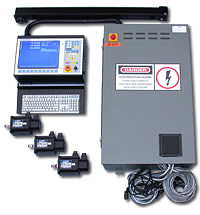
Centroid heading

July 2010 | E-Mail News

Highlights from earlier


version 2.68


Contact Machines in Motion regarding software updates for your Centroid powered CNC control.

Last updated July 2010         Request a quote

Centroid E-Mail news is published randomly by Centroid for their dealers. Machines in Motion Inc. is presenting this information for your general knowledge. We do not expect Centroid control users to implement any of these topics on your own. We simply wish to make you aware of the latest possibilities for your current Centroid powered machine.

July 2010 Email News 

New All-In-One DC Control Visual Price Sheets
Centroid recently released the new All-In-One DC  -- featuring an MPU11 motion controller, 3-Axis DC servo drive (expandable to 6 axes), and expandable PLC I/O all on one affordable board.  Introductory list price for the All-In-One DC with CENTROID software is still only $1995 USD. 
All-In-One DC Board Level:


                  Click the image above to view larger.
In the future we intend to produce similar visual price sheets for all types of systems.

PC Requirements for MPU11-Based Controls When You Provide the PC computer.

Dealer or customer supplied PCs for use with MPU11-based controls must meet the following minimum requirements:

  • Windows 7 Operating System - At this time MPU11 systems for user-supplied PCs are Windows 7 ONLY (not Linux).
  • 1 GHZ processor
  • 1 GB RAM

Although the above specifications are the minimum requirements, Centroid recommends:

  • 2 GHZ processor
  • 2 GB RAM

Tuning Velocity Mode Drives For MPU11

New information is being added periodically to regarding the tuning of third party drives, as testing is completed and procedures are written.  Currently there are three drive-specific bulletins on this subject:

  • Delta AB and A2 Drive Setup for CNC11 Systems
  • Glentek Alpha Drive Setup for CNC11 Systems
  • Baldor Series 23H Drive Setup for CNC11 Systems

...and three more in progress...

  • Sanyo Denki Drive Setup for CNC11 Systems
  • Maxsine EP100 Drive Setup for CNC11 Systems
  • Fanuc Black and Yellow-cap Drive Setup for CNC11 Systems

Beta Software Releases Available

Centroid has begun periodically posting BETA development builds of Centroid software on the Dealer Support Site. These versions may be provided for those who wish to try the latest features prior to official version releases. Although we make reasonable effort to ensure that these BETA versions will be safe to use, they are provided for use COMPLETELY AT YOUR OWN RISK, with absolutely no guarantee of reliability, or fitness for a particular purpose.

If you have any questions or concerns regarding beta software downloads, compatibility,
and/or upgrading, please contact Machines in Motion Inc.

New Advanced Acceleration/Deceleration (AD2) Interface in Beta Releases

AD2 Acceleration and Deceleration parameters can now be configured via its own menu options in software versions greater than CNC11 3.01 or CNC10 2.69 rev22. 

March 2010 Email News 

CENTROID is pleased to announce a new All-In-One DC Control featuring an MPU11 motion controller, 3-Axis DC servo drive (expandable to 6 axes), and expandable PLC I/O all in one affordable unit. Introductory list price for the All-In-One DC with CENTROID software will be $1995 USD. This represents a significant savings when compared to the current equivalent list price of a DC3IOB + MPU11 + software for $2664.

See the Quotation form for more information on component pricing and available options.  or

Click here for a graphic layout of the system you can build with these components.

- CNC Software Package A for New control sales NOW INCLUDES:
Cutter compensation
Drilling cycles
Compression Tapping cycles
Intercon on the control
S function spindle speed control
Multi range spindle
4th axis software
Spindle Orientation
WCS G54-59
M98 G65 Subroutines and Macros with user definable variables
4Mb G-code files size
Laser compensation tables

- Price Reductions on CNC software options.
Starting March 1st, all new controls will ship with FREE Work Coordinate Systems G54-59, Subroutines and Macros with user definable variables, Compression Tapping cycles, Drilling cycles, Spindle Orientation, Multi range spindle, 4th axis software, and larger standard g code file size now increased to 4MB. All other software options have had a significant price reduction as well.
Dealer discounts for software options have changed as well, since we have reduced the prices so significantly, a lower CENTROID dealer discount will apply. If you have a control system with 2.60+ it is a simple upgrade to 2.68 with get these new Free software features.


- Software Upgrade Path

Also interesting, any CNC10 based control software that is updated to version (v2.68), will not require unlocks to receive the now free options. These new "Free" options are included with that version of software. You simply have to update Your current Centroid control to the latest version (v2.68) and those options will automatically be activated. This is a nice selling feature to encourage software upgrade sales, the customer will not only be getting the latest version of CENTROID CNC software but also free Work Coordinate Systems G54-59, Subroutines and Macros with user definable variables, Compression Tapping cycles, Drilling cycles, Spindle Orientation, Multi range spindle, 4th axis software, and larger standard g code file size now increased to 4MB is included with v2.68.

This no-unlocks-required software version is scheduled to be released within the next few weeks.
For any control running software versions below 2.60, a new flash card is needed. You may also need an updated computer, flash card reader, &/or larger RAM memory.

2.66 Software Release

January 1, 2010 Centroid has released it's latest software update. Among the new features are:
  New Backplot (tool path graphing) has been implemented with Graphics Acceleration to improve speed and usability. Additionally, mouse control has been implemented for view rotation, panning, and zoom. This new backplot is only available for Mill controls.
  Several improvements to the engine block features of our specialty control systems. Contact Machines in Motion Inc. for specific details.
  Changed the maximum length of the file name to 1024.
  G2/G3: Huge arc radius crash (that occurs only in a specific machine configuration) has been corrected.
  Added an online user manual to the CAMS menu. 
  >>Update to fix crash when exiting NEDIT << 
  NEDIT: Added F8 Save key.
  Other Changes and Minor Bug Fixes

MPU11
MPU 11 Hardware set available 

While Centroid has not issued one of their dealer newsletters Machines in Motion Inc. is here to announce that during the summer of 2009 Centroid has completed their latest CNC control hardware set. It is expected that by early 2010 the MPU11 hardware set will replace Centroid's current CPU10 based control hardware. This new board set provides faster processing and update times than earlier system boards. It also resides outside of the PC computer eliminating related technical problems such as phased out ISA or PCI expansion slots. Instead, the control PC will communicate to the MPU11 control board via Ethernet . Many new features will be developed for this updated board such as dual feedback, allowing the use of scales for increased precision. Velocity loop servo control. More PLC inputs & outputs. A more responsive MPG. Simpler connection to third party servo drivers and more. It is expected that the MPU11 hardware set will be more user friendly for the DIYS types.

Centroid Falsh card hard drive
2.64 Software Release
January, 2009

CNC 10 v2.64 Released

CENTROID is pleased to announce the recent release of CNC10 v2.64. This maintenance release supersedes the 2.63 release and it is recommended that all systems currently running 2.63 be upgraded to 2.64. 

In this release:

  • The editor (NEDIT, which is accessed by pressing F6 from the main screen) has been modified with added function key shortcuts at the bottom of its user interface, in order to make it more compatible with the look and feel of the rest of the CNC control software. In addition, syntax highlighting has been added (to make G/M code programs easier to scan, read, and edit).
  • An issue regarding the Feed Hold and Tool Check keys, which occurred on some manual tool change machines has been fixed.
  • Several other minor changes and fixes have also been implemented.


disk

2.63 Software Release
December, 2008

Centroid is pleased to announce the recent release of CNC10 v2.63. With this release Centroid has added several new features, and made extensive software improvements.

Some highlights include:

* Added Remote Access and Diagnostics. This feature allows technical support to remotely logon to a control via the Internet for the purpose of remote diagnosis, viewing, and file transfer. If you're Centroid technician is on-site and on the 'net, Centroid Factory tech support can be right there to assist.
* An angle probing cycle has been added to automatically calculate an angle from any two probed points.
* An Engine Block Interface has been added under the CAM menu (F5). This is a specialized conversational interface to support machining, probing, and inspection of automotive engine blocks.
* Accel/Decel module improvements and other changes to improve smoothness of operation, particularly in metric mode.
* CNC Linux now works with Active Directory Network without the need for a bridge PC.
* Extensive improvements in Metric handling.
* Improved Backlash functionality to allow for use of both positive and negative Backlash comp values while Laser comp is in use, in order to adjust the laser-compensated backlash.
* Added foreign language translations in German, Swedish, and Finnish.

An All-In-One USB Software Update is available to update both CNC10 and CNC Linux from any earlier 2.6x version to the current version in a single update. This allows you to update your control software with one simple update, as long as your existing version is 2.6x or newer.

Beginning with software version 2.60 Centroid has upgraded the core Linux operating system. This newer operating system prevents us from providing a simple USB upgrade but allows us to expand your control's features and functionality.

Systems running 2.36 and earlier require a new flash card which is available from your local Centroid dealer (and Machines in Motion Inc.). All of your G-code files, Intercon files, and option unlocks will be transferred to the new flash card/hard drive.


disk
2.36 Software Release
September, 2007

Some of the new features found in our latest version software include:

Dig To Cad Menu - A new button was added to the Digitize Menu that will convert 3-axis and 5-axis digitized files to a CAD compatible format. The user can still use the old 3-axis method for converting digitized files found in the utility menu. However, this method does not work for 5-axis digitized files.

Inverse Time Parsing - CNC10 now converts inverse time feed rates (1/time) into standard feed rates (units/time) while parsing G code. G93 now turns on inverse time parsing and given feed rates will be converted to standard feed rates while parsing. G94 disables inverse time parsing and given feed rates will be interpreted as units/time. An inverse time smoothing algorithm is incorporated with this feature and is enabled by default. The smoothing algorithm can be disabled by adding 8 to parameter 56.

Command Line History - Pressing up in MDI will bring up your last entered command. Up and down scrolls through the history stored in the file.

motor
New 750 watt Motor


CENTROID is pleased to announce that a new SEM 750 watt servo motor replaces the old 750 watt motor. Our new motor provides more torque and is physically smaller than the old, while keeping the same price.

french
French Manuals & Control Software

July, 2007

In order to answer the demand from our French CENTROID control users, we are looking for Beta testers to test our French software and manuals.

Please contact Machines in Motion Inc. for more information.


building
CENTROID Opens Additional Location

CENTROID has opened an additional location to provide more space for machines, training, and system integration. With this extra space, high demand items will be kept in stock and ready-to-ship. This will allow CENTROID to shorten lead times while providing better customer service.

The new location is located in Curwensville, Pennsylvania.

Centroid Flash card

Create Copies of a CENTROID
CNC Linux Flash Card

March, 2007

Make copies of a CENTROID CNC Linux based flash card with your Windows PC. A tech rep "must have" WinImage. WinImage is a shareware program that will allow you to copy Linux flash cards with your Windows PC. This useful tool is great for building multiple flash card hard drives with default configurations, upgrading the customer to a larger Flash card, or even keeping a backup flash card for the customer. With WinImage you'll create an image of the FC and then copy/burn to any source such as a new larger FC or CD or HD for archiving.

Check out the (dealer) Tech Bulletin for complete instructions.

View and Copy Files From a CENTROID Linux based Flash Card

View and Copy Linux based files from a CENTROID CNC Flash card on your Windows PC using Explore2FS. This tool allows you to view and copy/paste any file from a Linux based CENTROID CNC flash card. This is useful for retrieving system configuration files and part program files. All you'll need is the explore2fs.exe program and a compact flash card reader.

Check out the (dealer) Tech Bulletin for complete instructions.


A note to Machines in Motion customer's. It can be tempting to do this with your own control's flash card (hard drive).
FIRST: Make a report file and store it in a safe place. This will back up the machine specific files running on your control.
SECOND: Be aware, if you do something to corrupt your flash drive, the cost of our providing a replacement flash card, with all the required formatting, operating system, & control software is $295.00. These are available to ship the same day.


key

New Sentinel Key

Dealer's will soon be receiving a new upgraded sentinel USB keylock with Offline Intercon orders. The new key has improved construction and features a LED lit tip that can be viewed at any angle.

The new housing is more durable than ever before:

  • Case is constructed from a single piece of molded plastic
  • The metal connector continues into the housing for a more secure attachment
  • All keys will be shipped with a protective cap to keep the USB connections clean

The new USB keylock works with Offline Intercon v1.51+ and DEMO Offline v2.32+.


Machines in Motion can send you a copy of the Version 2.32 off-line Intercon program to run on your desk top or lap top computer. As noted, this software will work without the unlock key for practice or learning what conversational programming is all about. The Sentinel key is required to post out your program in G-code. If you would like a copy Just ask us.


Free Educational Software Package Policy

CENTROID is pleased to offer educational institutions “Free” CNC software options in addition to standard control software, when used in a classroom setting.  In order to qualify, please provide your Centroid Dealer the following information on your School’s letterhead. 

  • Overview of the Schools CNC program
  •  Instructor’s name, mail stop, email address and phone number
  • Copy of the course syllabus, with comments on how the CENTROID equipped machine will be utilized
  • Number of students currently enrolled per semester for the current year, next year and past years
  • Number of PC CNC/CAD workstations in the classroom


After completion of the sale and receipt of the information requested, CENTROID will issue to the Dealer a full compliment of our software options, a $10,900.00 value if purchased separately. The Dealer will issue the software to the school instructor.

The donated software options will include: 

  • Subprograms and Macros,
  • Compression Tapping,
  • Rigid Tapping,
  • Multiple Work Coordinates,
  • Coordinate System Rotation,
  • Scaling and Mirroring,
  • Unlimited File Size,
  • Mold Magic™,
  • Digitizing & Probing, (Requires purchase of CENTROID's DP-4 Probe)
  • Engraving,
  • Autocad® DXF Import.


Offline Demo CD CENTROID control and conversational programming software for all your student work stations are included.


If you have any questions feel free to contact our Sales Office at
714 528-7061 or via email sales@cncmachinesinmotion.com

Dealer School Photos

The Advanced Dealer Training was a great success! Thanks to all the dealers who attended in 2007.


Centroid DX-1 single axis controller

Linear package includes the DX-1 programming box with servo driver, servo motor, and cabling.


Some of the uses found for this package are:
  • Upgrading an existing back gage.
  • Building your own material stop for sawing or other applications.
  • Couple this servo system to a rotary table you already own.
  • Be creative. Any application where you need to program motion, repeat or adjust position, or feed at a programmed rate of speed.

Check Out These Great DX1 Prices

CENTROID has the lowest prices on Single Axis CNC control packages. All packages include pre-wire, motor cable and motor or rotary table. Check out these great prices on the DX1 control and DX1 control packages:

DX1 Single axis control................................................$2,995

Rotary packages:
DX1 with RT-100..........................................................$ 8,025
DX1 with RT-150..........................................................$ 8,995
DX1 with RT-200..........................................................$ 9,990
DX1 with RT-250..........................................................$11,295
DX1 with RT-320..........................................................$11,995

Linear packages:
DX1 with 7inlb motor.....................................................$ 3,735
DX1 with 10inlb motor...................................................$ 3,886
DX1 with 17inlb motor...................................................$ 3,925
DX1 with 29inlb motor...................................................$ 4,055
DX1 with 40inlb motor...................................................$ 4,195

DX1 with 750W motor...................................................$ 4,345
DX1 with 1KW motor.....................................................$ 4,425
DX1 with 2KW motor.....................................................$ 4,945
DX1 with 3KW motor.....................................................$ 5,352

 issues of Centroid News


menu
Choose F2 if the desired file is not on your control's hard drive.

         menu
Select the location of the desired file.

                    Menu
Advanced file search features can filter out unwanted file types making it easier to find the file you want.

Current Software v2.32

The current software v2.32 is available for download.

Software version 2.32 features a return to a "Function key driven, file loading menu system" to answer the need for an easy way to load a program into the control. With the simplified system, no knowledge of computer location paths is needed to load a file from common sources to the control. Users now can select the source to load a file from, with labeled Function Keys. Function keys for Floppy, USB, Hard drive, and LAN have been added. This new Loading system is called the "Simplified File Load" system. The new Simplified file load system is now the default system used by CNC10 to load G code and Intercon files onto the control from any source.


Additional helpful features have also been added such as:

  • Load an Intercon file (.ICN) from any source and Intercon will start automatically.
  • View and load any recently loaded files (both Intercon and G-code).
  • Sort by chronological or alphabetical order.
  • View on-screen help.
  • Toggle on/off the details about files your files.


Other 2.32 Improvements include:  radial digitizing, axis pairing, home to "alignment marks" homing routine, G76 fine boring cycle, CSR and WCS decimal places increased, probing retract rates and more.


Centroid pushbutton panel

Pendant One Shot Buttons

Did you know that you can setup One Shot Buttons to take care of tedious tasks? With the One Shot overlay these buttons are easily located in the auxiliary buttons section of the CENTROID jog pendant.


Icons

Review 
Tech Bulletin 194 for directions on how to setup one shot buttons.
Handwheel

Z-Axis MPG

Z-Axis MPG makes it possible to move the Z- axis while a job is in progress.

This is a much used feature on Water Jet cutting machines. You will also find this a popular option for routers and other specialty types of machinery.

Review
Tech Bulletin 186 for directions on how to set up "on -the fly" Z-Axis MPG Mode.
DX-1

DX1 Improved Incremental Jogging


We have improved incremental jogging by adding 3 programmable increments.  With the new changes, once the increments are set in the parameters for the first time, they can be selected on the fly!  Simply push and hold down the 1, 2, or 3 button on the number pad to display and set the jog increment all at the same time.

See above section for more info including prices and specifications.

Click here to download the brochure in PDF 

123

Stock Controls are ready to ship


Need it fast? Two standard types of control systems are now in stock ready to ship!

In stock:
M-400S with S-Function fully wired
M-400S with M-Function fully wired.

The controls are ready for immediate delivery.
Call sales @ 714 528-7061 for more details.

Click here for further details on the S-Function version
Click here for further details on the M-Function version 

CD disk

Mill Training Video Now Available
The all new CENTROID CNC Mill control training video is now shipping. One training DVD is included with every CNC Mill control purchased. This new 2 hour training video covers everything from powering up the machine, homing out, setting tool offsets, programming parts with Intercon, setting part zeros and using tool check and program restart features. A special section is included just for setting tool heights while using a CNC knee mill. This great training aid is only available on DVD. We are sending you two copies of the new DVD today, extra copies are available upon request.


5 axis cylinder head porting

5-Axis Innovations & Customer Success

Through the evolution of CENTROID’s 5-Axis Cylinder Head Porting program, customers are experiencing some great results. The introduction of our 5-Axis digitizing routines has allowed customers to complete heads in hours when they would normally take days to finish.

Time efficiency and quality have been our driving force for the latest version of our 5-Axis porting program. The tolerance and finished surface quality, is better than the best machines on the market today. What makes CENTROID’s 5-Axis program such a superior value? We offer a proven system - not just a machine.

  • You will receive a custom built 5 axis machining center engineered from the outset for the porting of cylinder heads.
  • You will receive 2 weeks of intensive training covering each phase of operation to capture your existing port geometry, then turn it into a tool path that will be identical on each and every head.


Our new advances became very evident during the recent digitizing and cutting of a complex Volkswagen head. The unique challenges faced on this project have pushed CENTROID to new limits. We (and you) can now take a 20 valve Volkswagen head and completely re-port it in less than 3 hours. This same process used to take as much as 3 weeks or more! With constant communication and support to our customers, every time Centroid makes a technological breakthrough you benefit too.


No Floppy
Floppy Drives Discontinued

Starting September 1st, 2005, Centroid will no longer offer the Floppy Disk Drive on our controls. Our customers report, using our USB port to be a much superior method of transferring files.

While Centroid is no longer offering an internal floppy solution, if needed, you have the ability to use a USB based Floppy Drive - pictured here.


Dual handwheels
New Dual Handwheel Control for Lathes

Add that natural, manual control feel, to your CNC Lathe with CENTROID's Dual Handwheels for Lathes. Order these with your next Lathe control and mount the magnetic case to your lathe. Our handwheels provide a familiar way to set up tools and touch off part zero positions for the operator. A rapid position joy stick is included. The new handwheels work with both AC and DC servo CENTROID Lathe CNC systems and offers improved control for both types by providing smoother more natural feel when jogging the machine.

Sealed keyboard
New Sealed Keyboard Available at a lower price

With any CENTROID CNC control you can use a regular PC keyboard or our fully sealed unit. We found that about half our customers prefer a regular open style PC keyboard and the other half prefer a sealed unit. The CENTROID sealed PC keyboard is liquid proof and provides reliable and durable keyboard operation in a shop environment. Our keyboard is: fully sealed, coolant proof, long lasting in shop environment, and has tactile feedback (raised buttons with distinct action). Only $485.00

CNC10 v1.11 Release

Centroid's new CNC10 hardware board requires the Linux
operating system. Expanded features and control abilities are now
available with this innovative combination. Current DOS based
controls can also use the Linux operating system for staying up to
date and to provide easier networking with other computers.
Added Features include:                                                            Aug. 2004
  • DXF Import: A new software feature that allows users to import Autocad DXF files into Intercon. It converts points, lines, arcs and circles from Autocad DXF files to Intercon operations. The Intercon operations include: linear, arc, irregular pocket, rectangular pocket, circular pocket, frame, drill, tap, bore and thread. DXF Import is a software unlock. This is an Optional control feature.
  • System Test: A G-code file that provides a thorough system test to prove the integration has been successfully completed. If the test has not been completed successfully, a warning message is displayed at startup (for systems with IDs after July 15, 2004)
  • Improved Keyboard Jogging: All previously known problems with Keyboard jogging and control have been eliminated. There is no longer any need for a special PLC program to work the spindle and coolant functions from the keyboard
  • Joystick jogging support: Machine parameters 124-127 can be used to specify PLC inputs to perform axis jogging for the first two axes. Intended for lathe applications but can be used in Mill software
  • Probe detection while jogging: Added probe protection while jogging. If the probe input is detected while jogging, jogging is stopped and only slow jogging is permitted until the probe input is cleared
  • Dwell time added to groove and turning cycles: Additional field in lathe Intercon groove and turning cycles to specify the amount of time to dwell before X axis retraction of the tool
  • Drag plot improvements: Now you can see and compare drag plots. Date of drag run is inserted into file, new runs are prepended to the old runs, old runs are displayed in red on graph, and the latest run appears in yellow
  • 5th axis pairing: Can pair 5th axis with 1st, 2nd, 3rd or 4th axis. Useful when one axis is driven by 2 servo motors.
  • Background editing: With Background Editing, the user has the ability to edit a G-Code file while CNC10 is running. This allows users to edit or write a G-Code program while cutting parts
  • G22/G23 work envelope soft limits: Programmable software travel limits enabled with G22 and disabled with G23
  • 90 day reminder to clean air filter: Every 90 days a reminder to clean the controls air filter is displayed on the screen
  • User Maintenance menu: <F6> User Maint. option added to utility menu. This menu provides user access to drag plot and lash compensation menus without requiring a password
  • Linux based: We are now shipping all normal orders with Linux.


The last DOS version of Centroid control software is v8.23 issued
July, 2004

October 26, 2003 news

    * New M-400 Brochure now available. Download from our web site in PDF.
    * Current CNC7 software is Version 8.21. Improvements and additions.
    * New 5C Collet Rotary table at a great price!
    * Now shipping! New SD3 and SD1 servo drives, faster, better, more power.
    * New DC single axis Servo drive makes 4th axis add on easy.
    * Mastercam no longer available.
    * New dual hand wheel support for simultaneous axis movement.
    * Now shipping! New PLC the RTK3 faster and simpler.
    * New 5 Axis CNC controls are shipping!
    * New Two axis intercon now available.
    * New on site Service contracts available.


CNC7 Version 8.21 is shipping with all new systems.

Below is a list of the new added features and options that you will want to know about.

    * 5th Axis Support: 8.21 can control 5 axes with a 6th axis spindle encoder input.
    * Dual Handwheels: Two handwheels can be used simultaneously. 
      Uses a free motor encoder input port for each handwheel.
    * 2 Axis Intercon: INTERCON MILL can post two axis programs.
    * New Aux key functions and One Shots: Aux keys can be programmed to execute CNC7
      functions such as Set ABS/INC Zero, Manual Mode, Power feed and INTERCON MILL 
      One Shots.
    * Enhanced Keyboard Jogging: Keyboard Jogging now supports spindle, coolant and Aux keys. 
      Keyboard jogging is now available in CNC7 LATHE AND MILL.
    * Distance to go DRO: A second DRO can be displayed showing the distance to go for each axis.
    * INTERCON Mill Help: Help pictures for most operations are now available. 
      It really makes intercon even easier to learn.
    * Lathe Tool ICONS Screen – In version 8.21 we have improved the tool library by changing the 
     “Tool Library” screen to a “Tool Details” screen. This screen recommends a nose vector based
      on graphical ICON selection of front/back approach, spindle direction, left/right spindle
      location, vertical/horizontal mounting, normal/reversed mounts, and hand of tool. Other 
      graphical selection ICONS are tool type, ID/OD operation, and coolant. Offsets and references
      can be set from this screen.
    * Smart Load Menu now Loads INTERCON Files – version 8.21: The CNC7 load menu (F2) now
      loads INTERCON files directly. F5 in the load menu switches to the INTERCON directory.

New PLC designed specifically for automatic tool changer machines.
     Centroid's new "Squid I/O module" reduces machine to control wiring time.
    * New "cabling concept", all cables are labeled and dedicated.
    * All cables are included and pre-made with labels attached.
    * Will be used in all future ATC control systems.
    * Compatible with both AC brushless and DC brush control systems.
    * Eliminates intermediate barrier terminal strips
    * Reduces # of connections and reduces chance of loose connections.
    * Built in relays for atc motor, carousel in/out, tool in/out, index sensors, flood and more.
    * Designed for both swing arm and carousel tool changers.
    * 35 inputs/38 outputs and 12 bit (smooth) spindle analog output.
    * Compatible with previous Centroid PLCIO2 communication protocol.
    * Looks like a giant squid.

DOS Software Version 8.11 
READ ABOUT PREVIOUSLY ADDED CENTROID CONTROL FEATURES 
or for more information please contact  Machines in Motion inc. 
(714) 528-7061
February 2003

Keyboard Jogging: - This allows you to run and jog the machine from the designated keys on the keyboard, eliminating the need for a Jog Panel.

Live PLC Debug: Now while your control is operating you can press ALT-I to display the PLC inputs, outputs, memory, and program stages.

Grid Digitizing Speed Improvements: Digitizing a part will now run about 25% faster. Imagine the time you will save for those large complex parts.

File Caching: This allows the control to load the file being cut from a remote location to the Flash card while the program is being cut. Once the program is cut the file will be stored in its original location.

User Specified Paths: User definable program storage using the following files Pathhm.ini(mill) and pathl.ini(lathe).

Input Macro: Gcode programs can now prompt the operator for input. The versatility and flexibility is endless. For example, if you have 10 parts that are all the same except for hole depth or diameter, you now only need one file instead of 10. You can cut different parts without having to download new files or change the set up.

Random Access Tool Changer - Enhanced tool changer support for random access tool changers, including first ever tool bin numbers, memory of ATC tool positions even at power down.

Coordinate System Rotation: This optional feature allows the entry of rotation angles between -90.0 and +90.0 degrees. Contact Doug at (714)528-7061 to purchase the unlock for this feature, which retails for $350. 

Irregular pocket cleanout: Clean out non-rectangular and non-circular shapes with a closed contour right on your control using Centroid's exclusive "Intercon" conversational part programming software. (included with every control)

Automated Part Counter: Users can enter the number of copies of a part they wish to cut, and have CNC7 automatically repeat the part until the desired number of copies is met. Use this feature with barfeeders on a lathe or on your mill.

Block Skip: Users can choose to skip lines in a CNC file that begin with a forward slash ('/').

Axis load meters: Monitor the load on your axis motors with this new graphical meter. The horizontal bars shown underneath the axis DRO reflect the current PID output for that axis.

Intercon integration: Intercon is now a part of CNC7M and CNC7T instead of being a separate executable as in previous versions. Works even faster.

"C" axis indexing control for lathes: This feature greatly increases the usefulness of lathes by making it possible to do live tooling on lathes to do side-drilling, or create pockets or flat surfaces. Initially, the index and hold method will be supported. Index position is controlled from a G-code in degrees -- much like a rotary table. The spindle can then be held firmly in place by a brake.  The "C" axis feature requires a spindle drive (inverter motor combination) which will accept Centroid's torque mode commands.  For smaller (table top) lathes under 1hp, Centroid can adapt our DC brush drive to control a DC brush spindle motor in both velocity and position "C' axis modes.  For higher horsepower, a third party inverter with torque mode such as the Control Techniques drive must be used.  Interpolated "C" axis is also available under G-code control.  However, it must be remembered that "C" axis is not as accurate or as powerful as a rotary table.  Applications are limited to light duty engraving where accuracy is not a concern.

Rapid override on F9 key: A rapid override button has been added. The F9 function key now appears during MDI, while running a job, and on the Run menu. It works in conjunction with the PLC/jog panel controlled rapid override.

Spindle speed display: This feature measures the spindle speed and displays an averaged value in the status window. The spindle speed display is activated by machine parameter 78, with a value of 1.0 turning it on. The measured speed is calculated from machine parameter 34 (Spindle Encoder Counts/Revolution) of the encoder that is connected to the axis specified by parameter 35 (Spindle Encoder Input).

New Digitizing Cycle, "Cam Copy": This new digitizing function will copy a 2D contour such as a Cam (commonly found in textile, newspaper and plastic bag machines) OR around the perimeter edge of an irregular shape. This new feature makes reproducing complex Cams or pockets fast and easy. Cam Copy takes the work out of reproducing complex 2D shapes.  A G-code program to cut the part is instantly created by Cam Copy.  Repeat-to-Depth is included for multi pass machining.  Adding cutter comp for any size cutter is made simple.  See instant graphics of the digitized part.  This feature received a lot of attention recently at the Southtec show.  Note: for our existing Digitizing customers -- Any control that currently has the Digitize option will automatically have this new feature once it has been updated to 7.54.  Centroid User Bonus!

Error Message Log: Message logging allows technicians to display a file of past error messages. See the Message log section in the Version 7.50 (or newer) manual.

Data recording macros (M120, M121, M122, M123): Allows the recording of machine positions into a file. This is best used with the new Custom Probing Feature to do custom CMM (coordinate Measuring) and custom Digitizing operations.  See the Version 7.50 manual (or newer) "M" function section.

Custom Probing macros (M115, M116, M125, M126): Allows the Probing of positions from a user's G-code program.  Example uses are automatic Probing and setting a part zero, automatic probing and setting a scale factor depending on the size of the part on the table.  See Version 7.50 (or newer) operator's manual "M" function section.

Z-axis scale summing: Scale summing allows a quill scale to be summed with the A-axis of a bed-type mill.  This is a handy feature for those cases where a Z-axis quill has a (glass) scale installed. See CNC Tech Bulletin #131.

Bi-directional laser compensation: The bi-directional laser compensation feature uses two tables (one for each direction) to compensate for pitch error. As an extra benefit, "Lash" (backlash) is automatically compensated continuously over the entire length of travel.  Also included is a manual input table feature that allows technicians to had key in adjustments to the compensation tables without having to re-laser the system.

Arithmetic functions in G-codes and user variables: Allows calculations within G-code programs. Useful for advanced G-code programming applications. For example: a taper or "draft" could be put into a part program by repeatedly calling a 2D contour while computing a new smaller scale factor and depth for each pass.

Important notice regarding Mastercam: Systems shipping with software version 8.01 will no longer include Mastercam (Level 1, V3.21) as a standard feature. If you require Mastercam (Level 1, V3.21) to be included in your systems, please contact your Centroid representative to make arrangements. Please note that effective Sept. 1st, 2002, Mastercam will be a software accessory. Contact  Machines in Motion  for more information.


Presented by Machines in Motion Inc. last updated November 12, 2007

cnc mill, cnc retrofit, cnc control, cnc machine

| Controls Home page | New Machinery page | Request a Quotation | Control Financing |
| Upgrade your current Centroid control | On-site service | Send me literature or DVD presentation |
| CNC retrofit controls | M-400ATC | M-400 | M-39 | T-400 | T-39 | NEWS | Why Centroid |
| Centroid control Options | Intercon off-line | Digitizing | Probing | TT-1 Tool touch-off |
| Lathe tool Turret | VacuVise | Rotary tables | Gallery of completed installations |
| Engraving Software | CHNC Package | Downloads page | Do it yourself |
| Standard terms and conditions |


Contact us directly or Email us at sales@cncmachinesinmotion.com
(c) Copyright 2007 Machines in Motion